Configurare Checkmk
Questa guida spiega passo dopo passo come configurare un'istanza Checkmk in InfraWatch.
Prerequisiti
- Accesso a un'installazione Checkmk (versione 2.x o successiva)
- Diritti di amministratore in Checkmk per creare un utente di automazione
- Il sito Checkmk deve essere raggiungibile dal tuo smartphone (eventualmente tramite VPN)
Passo 1: Creare un utente di automazione in Checkmk
InfraWatch richiede un utente di automazione dedicato in Checkmk.
- Accedi all'interfaccia web di Checkmk
- Vai a Setup → Users → Users
- Clicca su «Add user»
- Compila il modulo:
- Username: p.es.
infrawatch_app - Full name: p.es.
InfraWatch App User - Authentication: Scegli «Automation secret for machine accounts»
- Copia l'Automation secret generato automaticamente!
- Username: p.es.
- Imposta il ruolo dell'utente:
- Minimo:
monitoring_user(solo lettura) - Consigliato:
user(include Acknowledge e Downtime)
- Minimo:
- Clicca su «Save»
Passo 2: Determinare l'URL del server
L'URL per InfraWatch è composto come segue:
https://<server-checkmk>/<nome-sito>Esempi:
https://checkmk.azienda.it/monitoringhttps://192.168.1.10/cmk
Passo 3: Aggiungere l'istanza in InfraWatch
- Apri InfraWatch e tocca l'icona Impostazioni (⚙️)
- Tocca «+ Aggiungi istanza»
- Seleziona come tipo: Checkmk
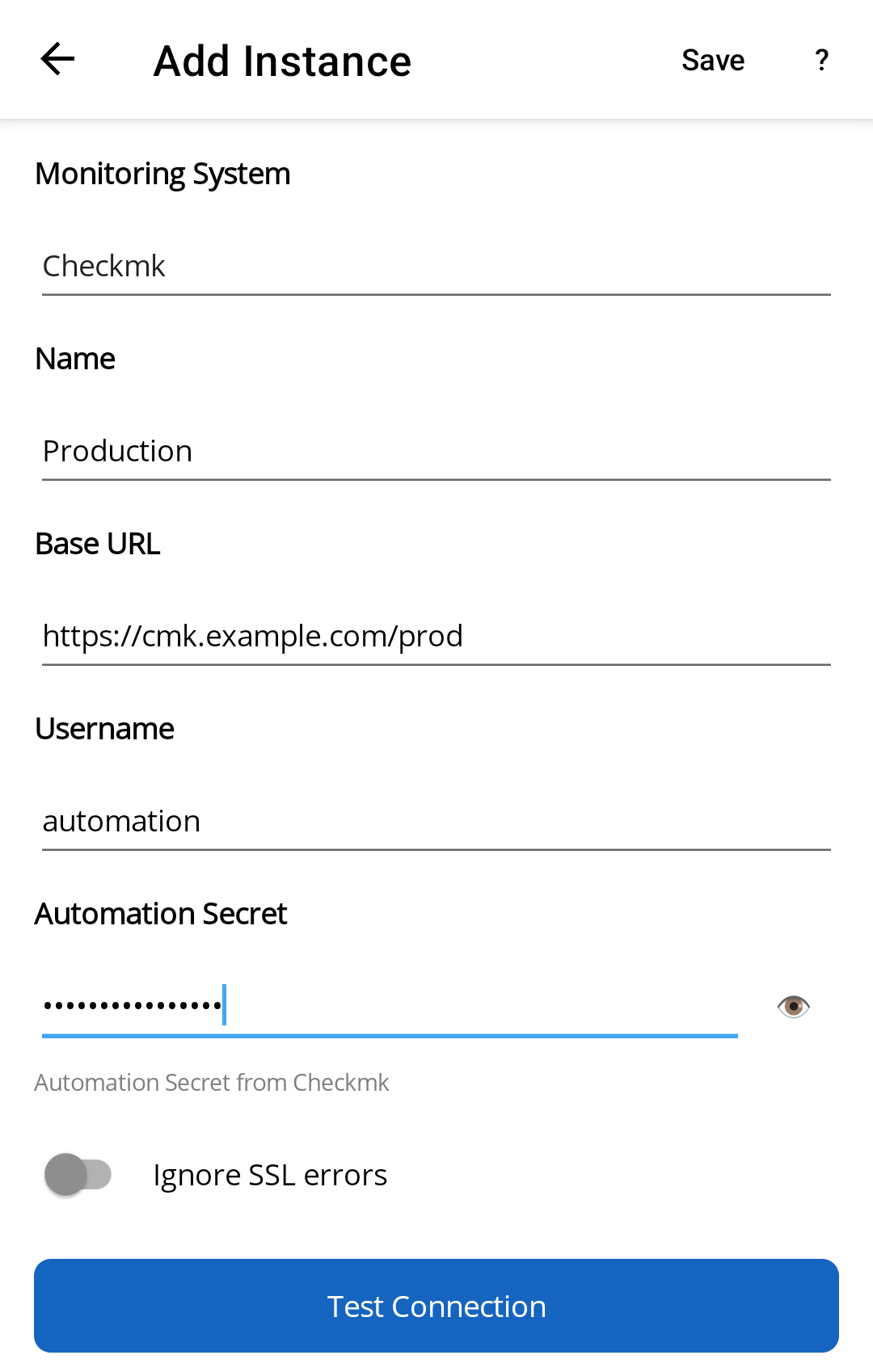 4. Compila i campi:
| Campo | Descrizione | Esempio |
|---|---|---|
| Nome | Nome descrittivo | CMK Produzione |
| Tipo | Sistema di monitoraggio | Checkmk |
| URL server | URL del sito Checkmk | https://cmk.azienda.it/monitoring |
| Nome utente | Nome dell'utente di automazione | infrawatch_app |
| API Key | Automation Secret | abc123...xyz |
| Ignora SSL | Solo per certificati autofirmati | ☐ |
Passo 4: Testare la connessione e salvare
- Tocca «Testa connessione»
- Se ha esito positivo, tocca «Salva»
- Attiva l'istanza con l'interruttore
Possibili messaggi di errore:
| Errore | Causa | Soluzione |
|---|---|---|
Network error | Server non raggiungibile | Verifica URL e VPN |
API error 401 | Credenziali errate | Verifica nome utente e API key |
API error 403 | Diritti insufficienti | Verifica il ruolo utente in Checkmk |
Errore certificato | SSL autofirmato | Attiva «Ignora SSL» |
Domande frequenti
Quale versione di Checkmk è supportata? InfraWatch supporta Checkmk dalla versione 2.0 (REST API v2).
Funziona con Checkmk Raw Edition? Sì, tutte le edizioni sono supportate (Raw, Free, Enterprise, Cloud).
Posso aggiungere più siti Checkmk? Sì, ogni sito è un'istanza separata in InfraWatch.